Native/Icon
Customized ads that blend seamlessly with the app's natural look and style.
Introduction
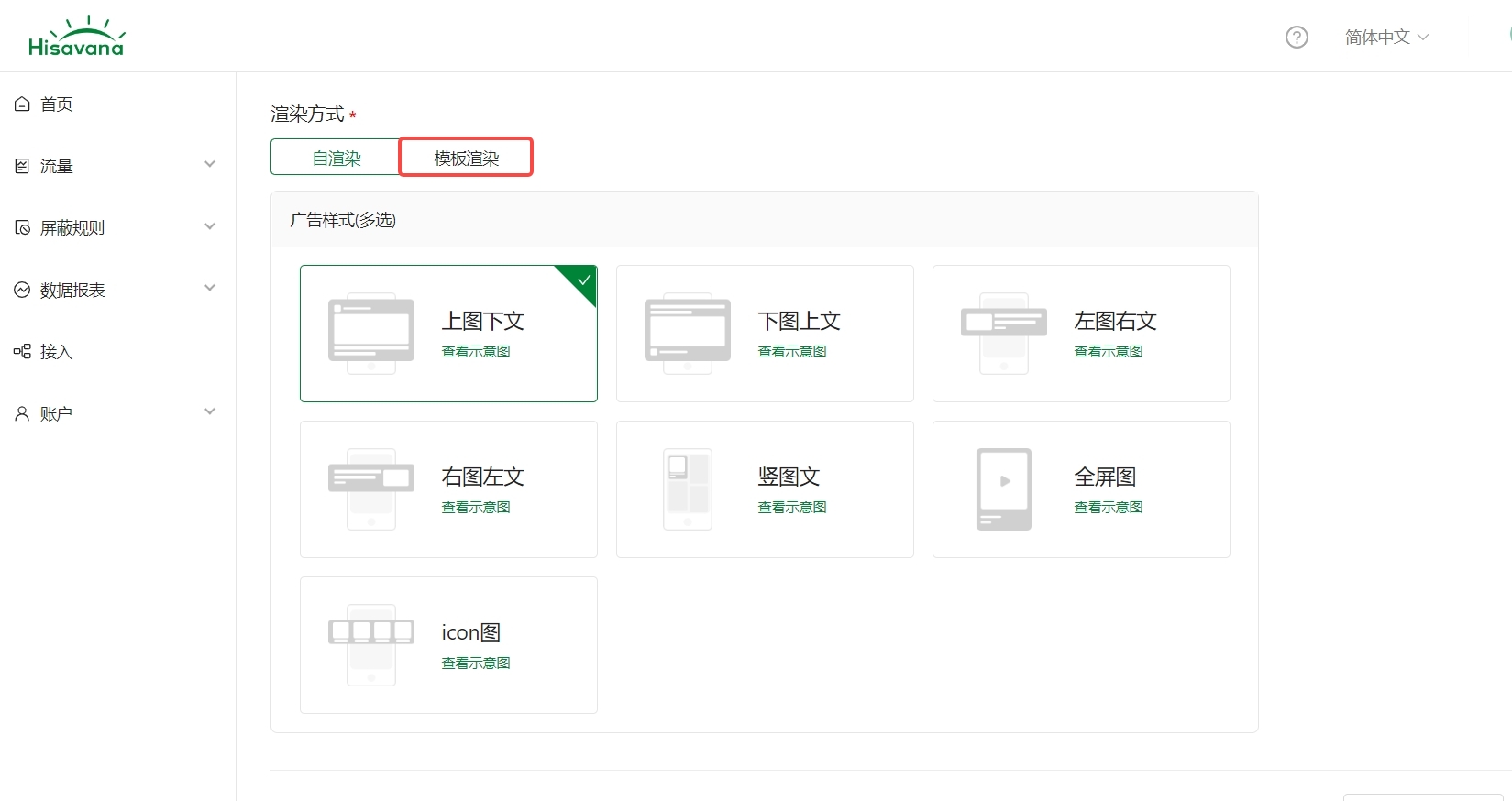
Rendering Methods
| Type | Description |
|---|---|
| Self-rendering | The ad platform returns ad materials that are assembled by the developer. The type selection must be consistent with the Hisavana SSP platform, otherwise the request will fail. |
| Template rendering | The ad platform returns a pre-rendered view, which can be displayed by directly adding it to a container on the page. |
Self-rendering:
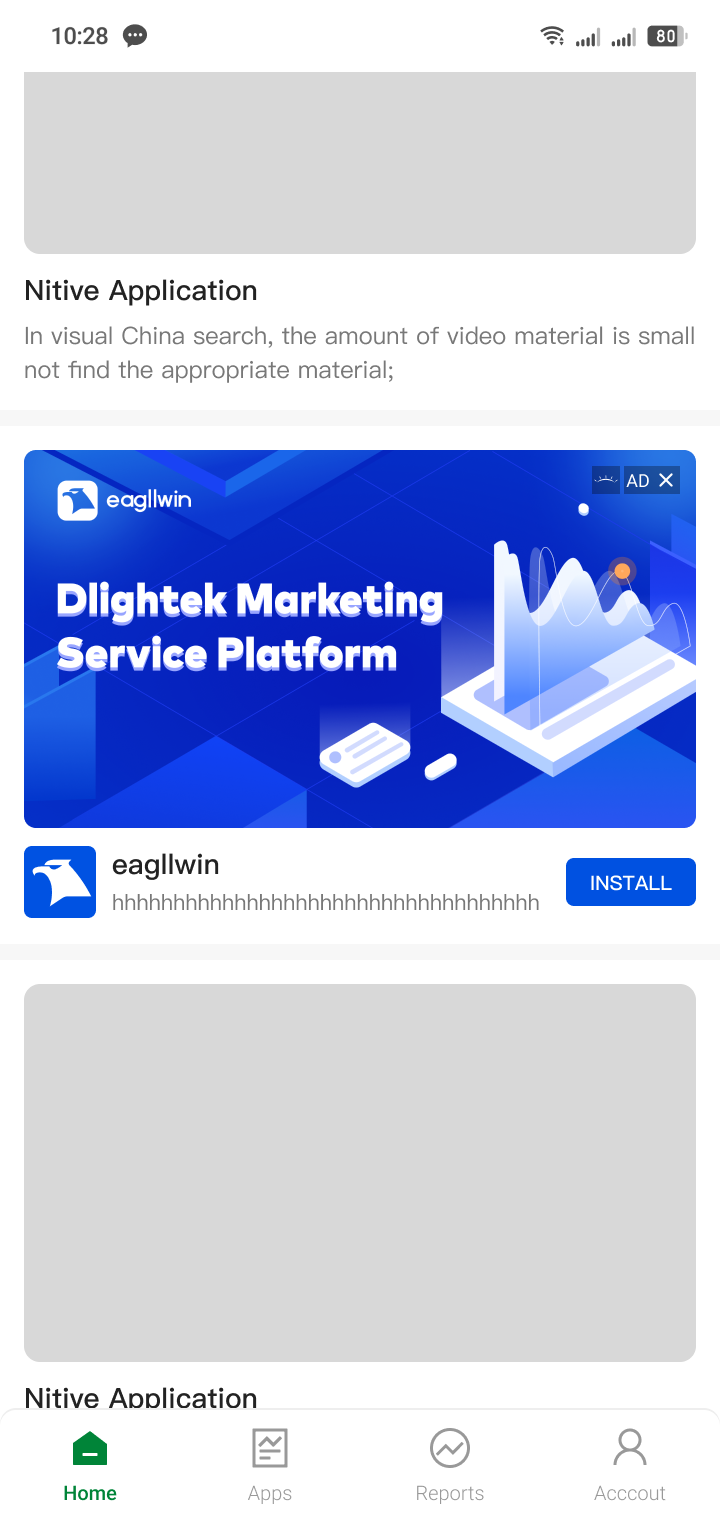
Template rendering: Supports image above text, text above image, image left text right, text left image right, vertical image text, full-screen image, and allows fine-tuning of display styles.
| Image Above Text | Text Above Image | Image Left Text Right |
| 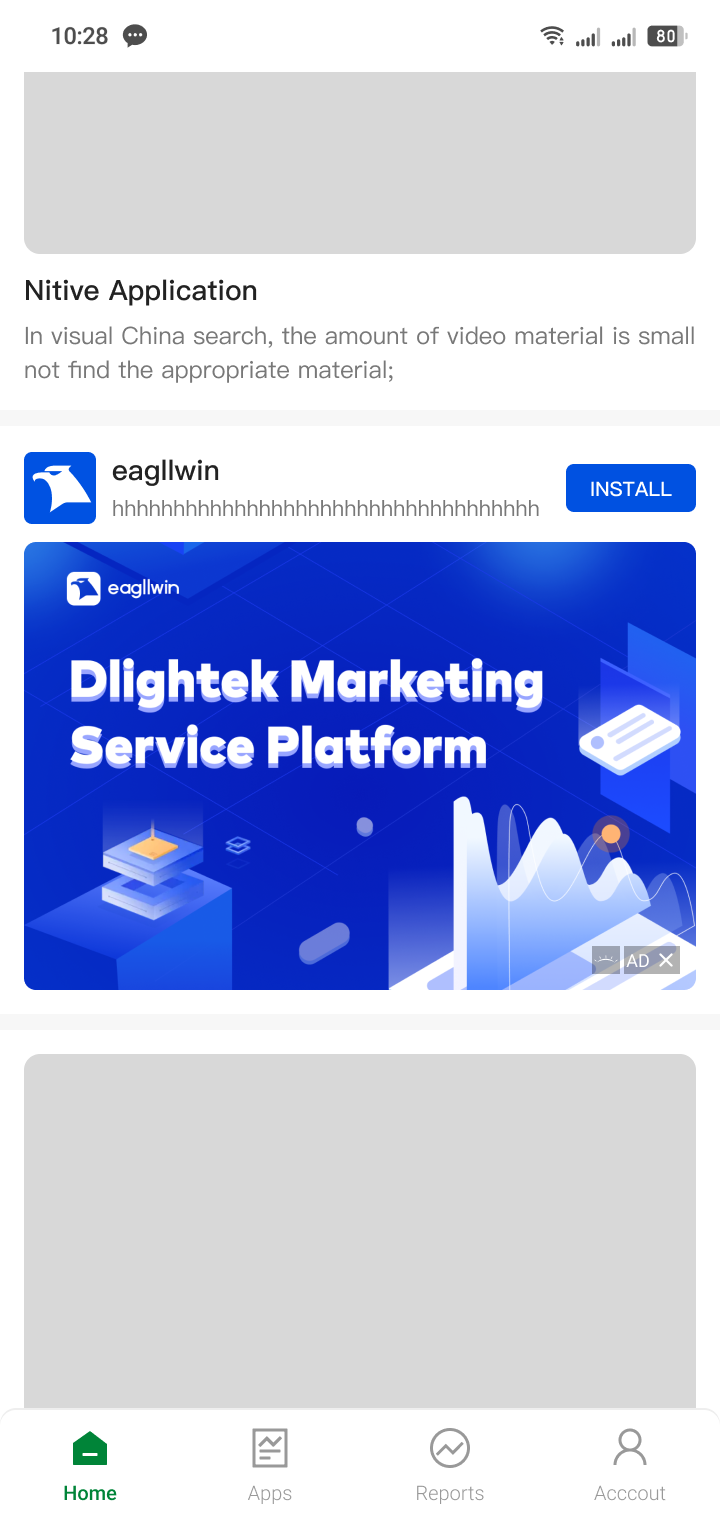 | 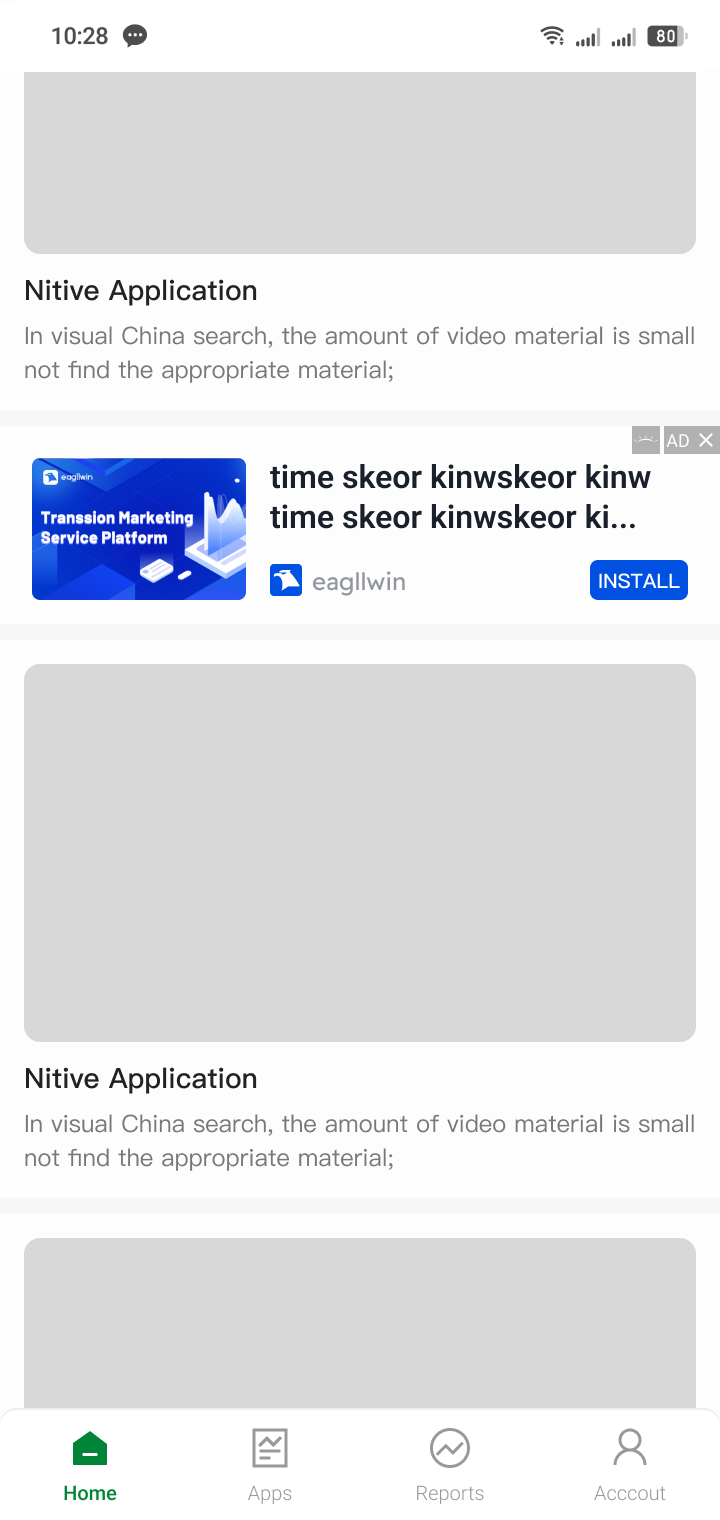 |
| It is recommended not to restrict layout height | ||
| Text Left Image Right | Vertical Image Text | Full-screen Image |
|---|---|---|
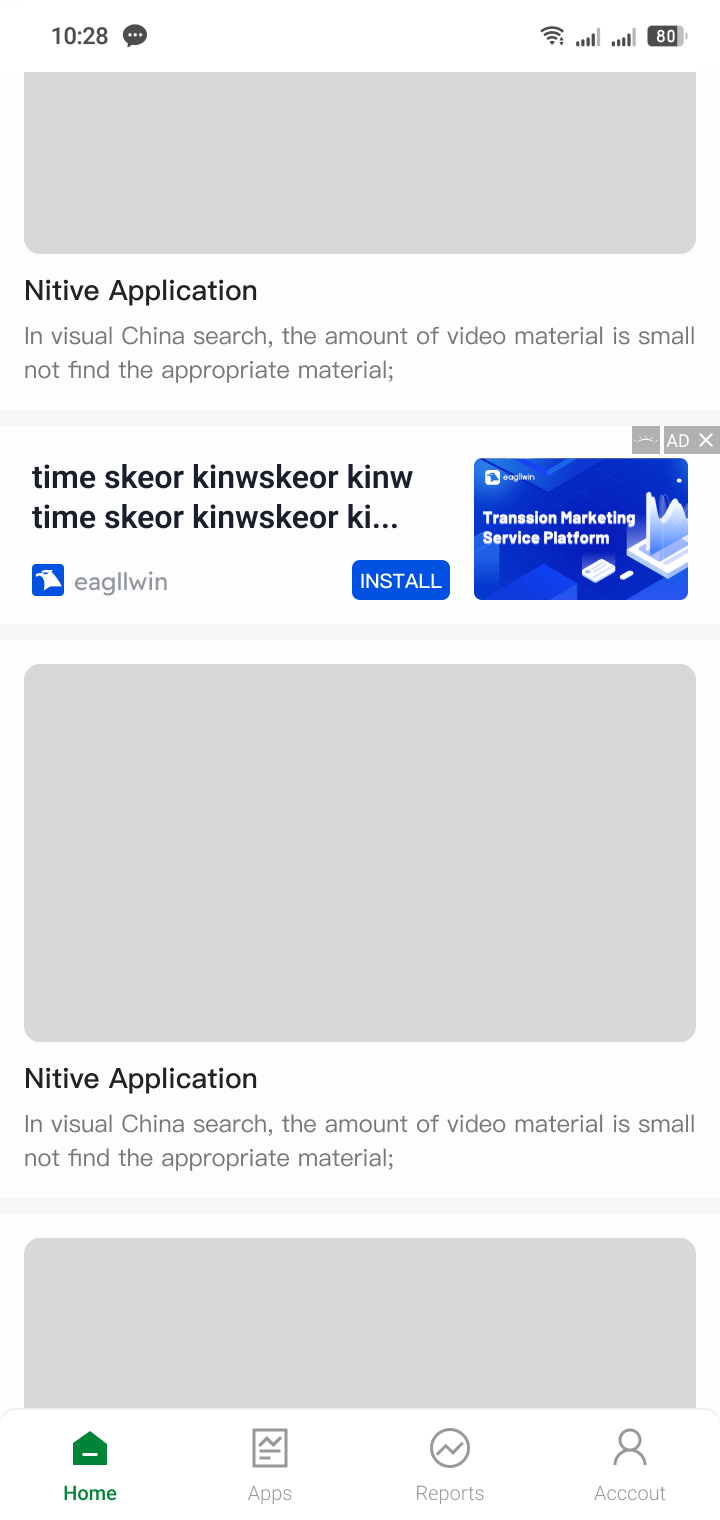 | 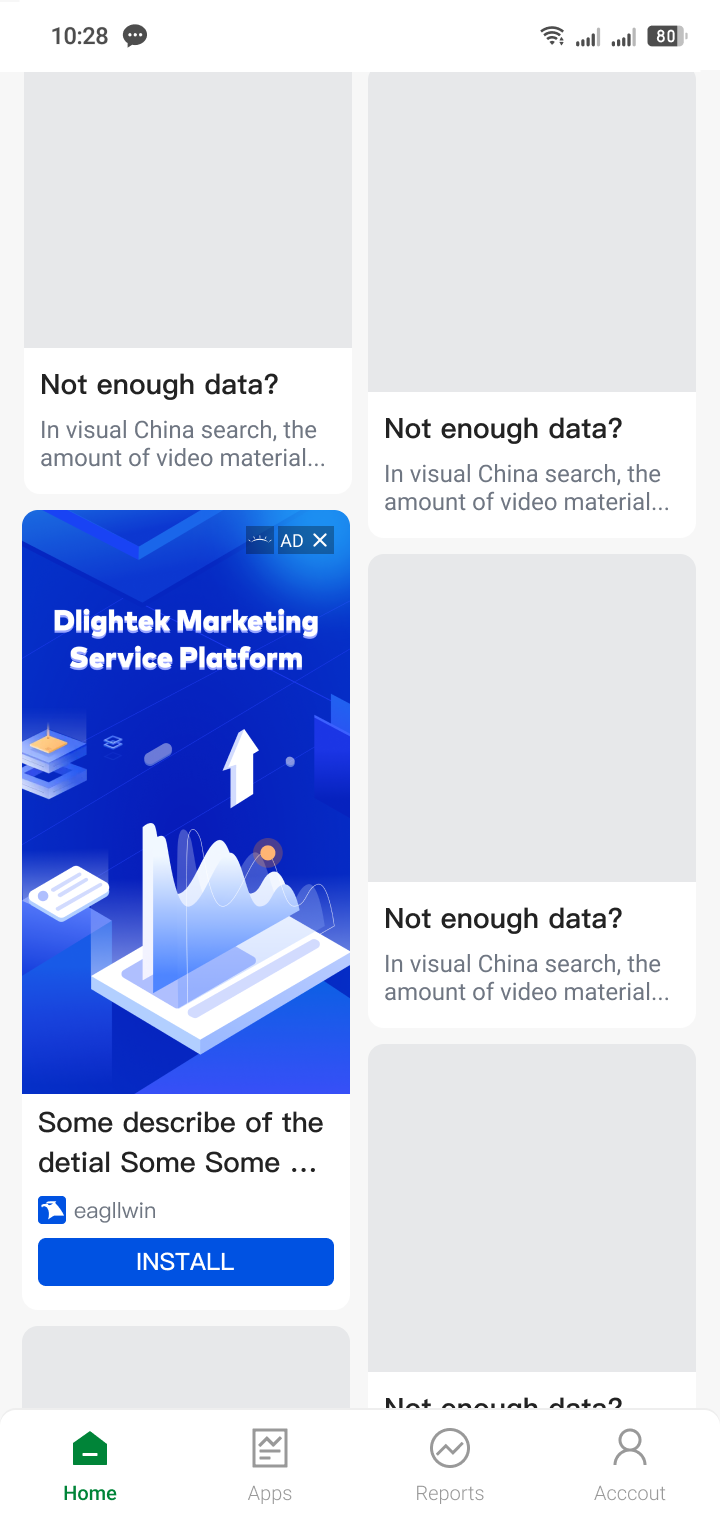 | 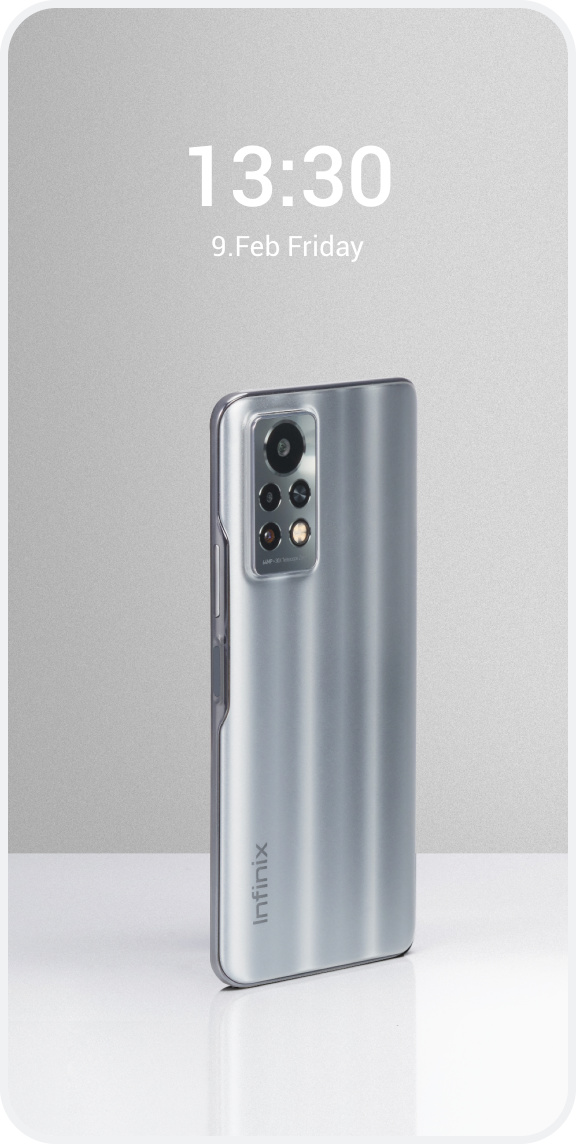 |
| Recommended not to restrict layout height | Recommended not to restrict layout height, recommended to restrict layout width | Recommended layout width and height are match_parent |
We recommend that you download and experience the Hisavana SSP Demo to gain a more intuitive and in-depth understanding of the SDK's features and usage. Through the Demo, you can quickly get started and explore its application in real-world scenarios.
Ad Types
| Type | Description |
|---|---|
| Native | The content area contains custom styles such as ad identifier, ad source label, main image, title, description, button, etc. The default number of ad requests is 1 (recommended to use the default). After the onAdLoaded callback is successful, display the first ad in the array. |
| Icon | Typically, the content area only contains an Icon image. The default number of ad requests is 1, the maximum number of requests is 5. After the onAdLoaded callback is successful, display the ads in the array. |
Load Ads
Native: Please configure the corresponding parameters and callback listeners. Be sure to carefully review the documentation for the applicable ad placement types in relevant callbacks to avoid integration discrepancies.
// Initialize the Native ad object, where "native_id" is the Native ad unit ID
TNative tNativeAd = new TNative("native_id");
// Set the ad listener
tNativeAd.setListener(new TAdListener());
// Load the ad
tNativeAd.loadAd();
Icon: Please configure the corresponding parameters and callback listeners. Be sure to carefully review the documentation for the applicable ad placement types in relevant callbacks to avoid integration discrepancies.
// Initialize the Native ad object, where "icon_id" is the Icon ad unit ID
TNative tNativeAd = new TNative("icon_id");
// Set the ad listener
tNativeAd.setListener(new TAdListener());
// Set whether to request an ad unit of type ICON
tNativeAd.setLoadIcon(true);
// Set the number of ad requests
tNativeAd.setAdCount(4);
// Load the ad
tNativeAd.loadAd();
Ad listener
// Ad listener, monitors callbacks for ad request timeout, loading completion (fill), display, click, exception, and close actions
private static class TAdListener extends AdListener {

            // Exception callback (applicable ad slots: all ad slots)
            @Override
            public void onError(TaErrorCode adError) {
                Log.d(TAG,"Ad failed callback");
            }

            // Loading completion callback (applicable ad slots: Native/Icon)
            @Override
            public void onAdLoaded(List<TaNativeInfo> adInfos) {
                 Log.d(TAG,"Ad loaded callback");
            }

            // Click callback (applicable ad slots: Native/Icon)
            @Override
            public void onNativeAdClick(TaNativeInfo taNativeInfo)  {
                Log.d(TAG,"Ad click callback");
            }

            // Display callback (applicable ad slots: Native/Icon)
            @Override
            public void onNativeAdShow(TaNativeInfo taNativeInfo) {
               Log.d(TAG,"Ad show callback");
            }

             // onTimeOut() is deprecated. The SDK combines the current request result with its ad cache when loading times out:
             // if no usable ad is available, onError(...) is called; if a usable ad has already been obtained, including from cache,
             // the load is treated as successful and onAdLoaded(...) is called instead of onError(...).
            @Override
            public void onTimeOut() {
                Log.d(TAG,"Ad request timeout callback");
            }

            // Close callback (applicable ad slots: Native/Icon)
            @Override
            public void onAdClosed(TaNativeInfo taNativeInfo) {
                Log.d(TAG,"Ad close callback");
            }
}
Display Ads
Please display the TNativeView object.
Important Notes
Native: For ads that land on the PalmStore page, the storeMarkView (app store identifier) must be added, otherwise it will affect the redirect chain of download ads.
Icon: Usually, there is no need to set the main image, only the icon is needed.
For details, please refer to TaNativeInfo
Reminder: If you want to display self-rendered Native ads that comply with Russian regulations, see Show Russian Compliant Ads.
Step 1: Create a TNativeView object
// Please add TNativeView in the parent layout's xml
<androidx.constraintlayout.widget.ConstraintLayout
    xmlns:android="http://schemas.android.com/apk/res/android"
    xmlns:app="http://schemas.android.com/apk/res-auto"
    android:layout_width="match_parent"
    android:layout_height="match_parent">
    <com.cloud.hisavana.sdk.api.view.TNativeView
        android:id="@+id/native_view"
        android:layout_width="match_parent"
        android:layout_height="wrap_content"
        app:layout_constraintTop_toTopOf="parent"
        app:layout_constraintLeft_toLeftOf="parent"
        app:layout_constraintRight_toRightOf="parent"/>
</androidx.constraintlayout.widget.ConstraintLayout>
// Bind the view from the xml layout
TNativeView nativeView = findViewById(R.id.native_view);
or
// Manually create a TNativeView object and add it to the parent layout
TNativeView nativeView = new TNativeView(this);
Step 2: Add a sub-layout file
Native: Add a sub-layout file native_install.xml for Native ad elements, where the icon in the ad elements is rendered with ImageView, and the large image is rendered with MediaView. For details, please refer to Advanced Settings
<androidx.constraintlayout.widget.ConstraintLayout
    xmlns:android="http://schemas.android.com/apk/res/android"
    xmlns:tools="http://schemas.android.com/tools"
    xmlns:app="http://schemas.android.com/apk/res-auto"
    android:id="@+id/ad_unit"
    android:layout_width="match_parent"
    android:layout_height="wrap_content"
    android:background="@mipmap/item_background">
    <com.cloud.hisavana.sdk.api.view.MediaView
        android:id="@+id/coverview"
        android:layout_width="match_parent"
        android:layout_height="200dp"
        tools:background="#22000000"
        app:layout_constraintTop_toTopOf="parent"
        app:layout_constraintLeft_toLeftOf="parent"/>

    <com.cloud.hisavana.sdk.api.view.AdChoicesView
        android:id="@+id/ad_choice"
        android:layout_width="@dimen/dp_12"
        android:layout_height="@dimen/dp_12"
        app:layout_constraintLeft_toRightOf="@+id/native_ad"
        app:layout_constraintTop_toTopOf="parent" />

    <ImageView
        android:id="@+id/native_ad"
        android:layout_width="@dimen/dp_12"
        android:layout_height="@dimen/dp_12"
        android:src="@drawable/hisavana_ad_big"
        app:layout_constraintTop_toTopOf="parent"
        app:layout_constraintLeft_toLeftOf="parent">
    </ImageView>

    <ImageView
        android:id="@+id/native_ad_icon"
        android:layout_width="50dp"
        android:layout_height="50dp"
        android:layout_marginLeft="10dp"
        android:layout_marginRight="10dp"
        tools:background="#22000000"
        app:layout_constraintTop_toBottomOf="@+id/coverview"
        app:layout_constraintLeft_toLeftOf="parent"
        android:layout_marginTop="10dp"/>
    <TextView
        android:id="@+id/native_ad_title"
        android:layout_width="wrap_content"
        android:layout_height="wrap_content"
        android:layout_marginBottom="5dp"
        android:ellipsize="end"
        android:lines="1"
        android:textColor="@android:color/black"
        android:textSize="18sp"
        tools:text="Title"
        android:layout_marginTop="10dp"
        android:layout_marginLeft="10dp"
        app:layout_constraintTop_toBottomOf="@+id/coverview"
        app:layout_constraintLeft_toRightOf="@+id/native_ad_icon"/>

    <TextView
        android:id="@+id/native_ad_body"
        android:layout_width="wrap_content"
        android:layout_height="wrap_content"
        android:ellipsize="end"
        android:maxLines="2"
        android:textColor="@android:color/black"
        android:textSize="15sp"
        tools:text="des\ndes"
        android:layout_marginLeft="10dp"
        app:layout_constraintTop_toBottomOf="@+id/native_ad_title"
        app:layout_constraintLeft_toRightOf="@+id/native_ad_icon"/>

    <TextView
        android:id="@+id/rating"
        android:layout_width="wrap_content"
        android:layout_height="wrap_content"
        android:text="Rating"
        app:layout_constraintTop_toBottomOf="@+id/native_ad_body"
        android:layout_marginLeft="10dp"
        app:layout_constraintLeft_toRightOf="@+id/native_ad_icon"/>

    <Button
        android:id="@+id/call_to_action"
        android:layout_width="0dp"
        android:layout_height="wrap_content"
        android:text="DOWNLOAD NOW!"
        android:textAllCaps="false"
        android:layout_marginTop="10dp"
        app:layout_constraintLeft_toLeftOf="parent"
        app:layout_constraintRight_toRightOf="parent"
        app:layout_constraintTop_toBottomOf="@+id/rating" />

    <!-- For ads that land on the PalmStore page, the storeMarkView (app store identifier) must be added, otherwise it will affect the redirect chain of download ads. -->
    <com.cloud.hisavana.sdk.api.view.StoreMarkView
        android:id="@+id/ps_mark_view"
        android:layout_width="wrap_content"
        android:layout_height="wrap_content"
        app:layout_constraintBottom_toTopOf="@+id/call_to_action"
        app:layout_constraintEnd_toEndOf="parent" />

    <com.cloud.hisavana.sdk.api.view.AdCloseView
        android:id="@+id/hisavana_ad_close"
        android:layout_width="20dp"
        android:layout_height="20dp"
        tools:ignore="MissingConstraints"
        android:layout_margin="10dp"
        app:layout_constraintEnd_toEndOf="parent"
        app:layout_constraintTop_toTopOf="parent" />

</androidx.constraintlayout.widget.ConstraintLayout>
Icon: Add a sub-layout file item_icon.xml for Icon ad elements
<androidx.constraintlayout.widget.ConstraintLayout
    xmlns:android="http://schemas.android.com/apk/res/android"
    xmlns:tools="http://schemas.android.com/tools"
    xmlns:app="http://schemas.android.com/apk/res-auto"
    android:id="@+id/ad_unit"
    android:layout_width="wrap_content"
    android:layout_height="wrap_content"
    android:background="@mipmap/item_background">

    <ImageView
        android:id="@+id/native_ad_icon"
        android:layout_width="80dp"
        android:layout_height="80dp"
        android:scaleType="fitCenter"
        app:layout_constraintTop_toTopOf="parent"
        app:layout_constraintLeft_toLeftOf="parent"/>
</androidx.constraintlayout.widget.ConstraintLayout>
Step 3: Data and View Binding
Native
Binding: As shown below
// Please refer to the processing method in the ad listener "onAdLoaded(List<TaNativeInfo> adInfos)"
@Override
public void onAdLoaded(List<TaNativeInfo> adInfos) {
    Log.d(TAG,"Ad request successful");
    TaNativeInfo ad;
    if (adInfos != null && !adInfos.isEmpty()) {
       for (int i = 0; i < adInfos.size(); i++) {
          ad = adInfos.get(i);
          if (ad == null) {
             continue;
          }
          if (tNativeAd.isReady(ad)) {
             inflateView(ad, tNativeAd, nativeView);
             break;
          } else {
             Log.d(TAG, "Ad has expired");
          }
       }
    }
}
Self-rendering::
// For self-rendered ads, bind the fill data here
private void inflateView(TaNativeInfo adNativeInfo, TNative nativeAd, TNativeView nativeView) {
        ConstraintLayout adView = (ConstraintLayout) LayoutInflater.from(nativeView.getContext()).inflate(R.layout.native_install, null);
        // Bind icon control
        ImageView icon = adView.findViewById(R.id.native_ad_icon);
        // Bind ad main image control
        MediaView mediaView = adView.findViewById(R.id.coverview);
        // Bind ad source label control
        AdChoicesView adChoicesView = adView.findViewById(R.id.ad_choice);
        // Bind ad close control
        AdCloseView adCloseView = adView.findViewById(R.id.hisavana_ad_close);
        // Required: Bind app store identifier control
        StoreMarkView  storeMarkView = adView.findViewById(R.id.store_mark_view);

        // Bind title control
        TextView title = adView.findViewById(R.id.native_ad_title);
        // Bind description control
        TextView des = adView.findViewById(R.id.native_ad_body);
        // Bind call-to-action control
        Button calltoaction = adView.findViewById(R.id.call_to_action);

        TextView rating = adView.findViewById(R.id.rating);

        nativeView.destroy();

        // Set icon control
        nativeView.setIconView(icon);
        // Set ad main image control
        nativeView.setMediaView(mediaView, ImageView.ScaleType.FIT_XY);
        // Set ad source label control
        nativeView.setAdChoiceView(adChoicesView);
        // Set ad close control
        nativeView.setAdCloseView(adCloseView);
        // Required: Set app store identifier control
        nativeView.setPsMarkView(storeMarkView);
        // Add ad view
        nativeView.addView(adView);

        title.setText(adNativeInfo.getTitle());
        des.setText(adNativeInfo.getDescription());
        calltoaction.setText(adNativeInfo.getCtatext());

        if (!TextUtils.isEmpty(adNativeInfo.getRating())) {
            rating.setText("R : " + adNativeInfo.getRating());
        }
        List<View> adContains = new ArrayList<>();
        adContains.add(title);
        adContains.add(icon);
        adContains.add(mediaView);
        adContains.add(calltoaction);
        adContains.add(des);
        adContains.add(adView);
        adContains.add(adCloseView);
        adContains.add(storeMarkView);
        nativeAd.registerViews(nativeView, adContains, adNativeInfo);
}
Template rendering:
private void inflateView(TaNativeInfo adNativeInfo, TNative nativeAd, TNativeView nativeView) {
        // Template object
        TemplateStyle templateStyle;
        // Boolean type: "isChangeStyle"
        if (isChangeStyle) {
             // You can fine-tune the module yourself
            templateStyle = new TemplateStyle.Builder()
                    .titleSize(20).titleColor(HSCoreUtil.getContext().getResources().getColor(R.color.hisavana_ad_color_0051E1)).isTitleBold(0)
                    .descColor(HSCoreUtil.getContext().getResources().getColor(R.color.hisavana_ad_color_0051E1)).descSize(20).isDescBold(1)
                    .callToAction_text_color(HSCoreUtil.getContext().getResources().getColor(R.color.hisavana_ad_color_0051E1)).callToAction_text_isBold(1).callToAction_text_size(20)
                    .callToAction_background_color(HSCoreUtil.getContext().getResources().getColor(R.color.ad_button_bg_color))
                    .callToAction_corner_radius(0).callToAction_stroke_color(HSCoreUtil.getContext().getResources()
                            .getColor(R.color.hisavana_ad_color_0051E1)).callToAction_stroke_width(5)
                    //.callToAction_background_shape(HSCoreUtil.getContext().getResources().getDrawable(R.drawable.hisavana_bg_shadow))
                    .background(HSCoreUtil.getContext().getResources().getColor(R.color.hisavana_ad_color_787878))
                    .build();
        } else {
            // Use default template
            templateStyle = new TemplateStyle.Builder().build();
        }
        nativeView.setTemplateStyle(templateStyle);
        nativeAd.registerViews(nativeView, adNativeInfo);
}
Media configuration platform settings
Icon
Binding: As shown below
// Please refer to the processing method in the ad listener "onAdLoaded(List<TaNativeInfo> adInfos)"
@Override
public void onAdLoaded(List<TaNativeInfo> adInfos) {
    Log.d(TAG,"Ad request successful");
    TaNativeInfo ad;
    if (adInfos != null && !adInfos.isEmpty()) {
       for (int i = 0; i < adInfos.size(); i++) {
          ad = adInfos.get(i);
          if (ad == null) {
             continue;
          }

          // Example only shows 1 icon ad, if you need to display multiple, you can add binding via RecyclerView yourself
          if (tNativeAd.isReady(ad)) {
             inflateView(ad, tNativeAd, nativeView);
             break;
          } else {
             Log.d(TAG, "Ad has expired");
          }
       }
    }
}
// Bind the fill data here
private void inflateView(TaNativeInfo adNativeInfo, TNative nativeAd, TNativeView nativeView) {
        ConstraintLayout adView = (ConstraintLayout) LayoutInflater.from(nativeView.getContext()).inflate(R.layout.item_icon, null);
        // Bind icon control
        ImageView icon = adView.findViewById(R.id.native_ad_icon);
        // Set icon control
        nativeView.setIconView(icon);
        // Add ad view
        nativeView.addView(adView);

        List<View> adContains = new ArrayList<>();
        adContains.add(icon);
        adContains.add(adView);
        nativeAd.registerViews(nativeView, adContains, adNativeInfo);
}
Destroy Ads
Please recycle ads promptly, otherwise the App may experience memory leaks.
Native:
@Override
public void onAdClosed(TaNativeInfo taNativeInfo) {
    // After the ad is closed, if you no longer continue to use it, it is recommended that you release the view and ad object promptly to avoid memory leaks.
    if(nativeView != null){
      nativeView.destroy();
      taNativeInfo.destroy();
    }
}
// After exiting the ad scenario, please destroy the ad object.
@Override
protected void onDestroy() {
    super.onDestroy();

    // Release TaNativeInfo resources, "adInfos" is the list data in onAdLoaded(List<TaNativeInfo> adInfos)
    for (TaNativeInfo taNativeInfo : adInfos) {
       if(taNativeInfo != null){
          taNativeInfo.destroy();
       }
    }
    adInfos.clear();

    // Container resource release
    if (nativeView != null) {
       nativeView.destroy();
    }

    // Ad object release
    if (nativeAd != null) {
       nativeAd.destroy();
    }
}
Icon:
// After exiting the ad scenario, please destroy the ad object.
@Override
protected void onDestroy() {
    super.onDestroy();

    // Release TaNativeInfo resources, "adInfos" is the list data in onAdLoaded(List<TaNativeInfo> adInfos)
    for (TaNativeInfo taNativeInfo : adInfos) {
       if(taNativeInfo != null){
          taNativeInfo.destroy();
        }
    }
    adInfos.clear();

    // Container resource release
    if (nativeView != null) {
       nativeView.destroy();
    }

    // Ad object release
    if (tNativeAd != null) {
       tNativeAd.destroy();
    }
}
Other APIs
| API Call | Description |
|---|---|
| tNativeAd.setLoadIcon(boolean isLoadIcon) | If the current ad unit type to be requested is ICON, set to true, default is false |
| tNativeAd.setAdCount(int adCount) | The number of current ad requests, default is 1, maximum is 5 (when the ad unit type is ICON, multiple ads can be requested at once) |
| tNativeAd.isReady(TaNativeInfo taNativeInfo) | Checks if the ad is ready. true: indicates the ad is loaded successfully and within the delivery period, can call show() to display the ad; false: indicates the ad is not ready yet |
| adNativeInfo.isOfflineAd() | Whether the current ad is offline |
| tNativeAd.getBidPrice() | Gets the effective bid price of the ad, in cents/eCPM |
| adNativeInfo.getBidPrice() | Gets the effective bid price of the ad, in cents/eCPM |
Advanced Settings
Required Ad Elements

| Field | Description | Native | Icon |
|---|---|---|---|
| native_ad | Ad identifier, used to clearly indicate that the corresponding unit is an ad | Required | Optional |
| ad_choice | Ad source label | Required | Optional |
| hisavana_ad_close | Used to close the ad content | Optional | |
| ps_mark_view | Identifier used to launch the app store | Required (PS ads) | |
| coverview | Main content area displaying the ad (image, video) | Required | |
| native_ad_icon | Ad icon, a small-sized app icon using a square aspect ratio (1:1) | Optional | Required |
| native_ad_title | Main title text | Optional | |
| native_ad_body | Secondary body text (e.g., article or app description) | Optional | |
| call_to_action | A button or text field encouraging user action (e.g., "Visit website" or "Install"). You can display an app download icon instead of a button or text | Optional |
Displaying Russian Compliant Ads
Developers whose products are published on the Russian market and monetized through Hisavana SSP (integrated Hisavana SSP SDK) must strictly comply with Russian advertising laws.
Hisavana SSP SDK version 3.0.8 and above supports displaying ads that comply with Russian advertising regulations. You need to perform some additional integration-related operations when self-rendering Native ads.
The main integration differences are in Step 2 and Step 3 of the Display Ads section. We need to replace the display method of the Ad identifier view and add a Disclaimer view.
Reminder: The
General Versionbelow refers to the non-Russian compliant version.
Step 1: Create a TAdNativeView object
Same as above.
Step 2: Add a sub-layout file
Add a sub-layout file native_install.xml for Native ad elements, where the icon in the ad elements is rendered with ImageView, and the large image is rendered with MediaView. For details, please refer to Advanced Settings
<?xml version="1.0" encoding="utf-8"?>
<androidx.constraintlayout.widget.ConstraintLayout xmlns:android="http://schemas.android.com/apk/res/android"
    xmlns:tools="http://schemas.android.com/tools"
    xmlns:app="http://schemas.android.com/apk/res-auto"
    android:id="@+id/ad_unit"
    android:layout_width="match_parent"
    android:layout_height="wrap_content"
    android:background="@mipmap/item_background"
    android:orientation="vertical">

    <com.cloud.hisavana.sdk.api.view.MediaView
        android:id="@+id/coverview"
        android:layout_width="match_parent"
        android:layout_height="wrap_content"
        app:layout_constraintLeft_toLeftOf="parent"
        app:layout_constraintTop_toTopOf="parent"
        app:layout_constraintStart_toStartOf="parent"
        app:layout_constraintEnd_toEndOf="parent"
        tools:background="#22000000" />

    <!-- Required: Russian compliant version disclaimer View -->
    <com.cloud.hisavana.sdk.api.view.AdDisclaimerView
        android:id="@+id/ad_disclaimer_view"
        android:layout_width="0dp"
        android:layout_height="0dp"
        app:layout_constraintStart_toStartOf="@id/coverview"
        app:layout_constraintEnd_toEndOf="@id/coverview"
        app:layout_constraintBottom_toBottomOf="@id/coverview" />

    <com.cloud.hisavana.sdk.api.view.AdChoicesView
        android:id="@+id/ad_choice"
        android:layout_width="@dimen/ad_badge_height"
        android:layout_height="@dimen/ad_badge_height"
        app:layout_constraintEnd_toStartOf="@+id/ad_badge_view"
        app:layout_constraintTop_toTopOf="parent" />

    <!-- General version AD identifier, if you are upgrading from the general version, you need to replace the ImageView below with the AdBadgeView below -->
<!--    <ImageView-->
<!--        android:id="@+id/native_ad"-->
<!--        android:layout_width="@dimen/dp_12"-->
<!--        android:layout_height="@dimen/dp_12"-->
<!--        android:src="@drawable/hisavana_ad_big"-->
<!--        app:layout_constraintTop_toTopOf="parent"-->
<!--        app:layout_constraintEnd_toStartOf="@+id/hisavana_ad_close">-->
<!--    </ImageView>-->

    <!-- Required: Russian compliant version AD identifier -->
    <com.cloud.hisavana.sdk.api.view.AdBadgeView
        android:id="@+id/ad_badge_view"
        android:layout_width="wrap_content"
        android:layout_height="@dimen/ad_badge_height"
        app:layout_constraintTop_toTopOf="parent"
        app:layout_constraintEnd_toStartOf="@+id/hisavana_ad_close">
    </com.cloud.hisavana.sdk.api.view.AdBadgeView>

    <ImageView
        android:id="@+id/native_ad_icon"
        android:layout_width="50dp"
        android:layout_height="50dp"
        android:layout_marginLeft="10dp"
        android:layout_marginRight="10dp"
        tools:background="#22000000"
        app:layout_constraintTop_toBottomOf="@+id/coverview"
        app:layout_constraintLeft_toLeftOf="parent"
        android:layout_marginTop="10dp"/>

    <TextView
        android:id="@+id/native_ad_title"
        android:layout_width="wrap_content"
        android:layout_height="wrap_content"
        android:layout_marginBottom="5dp"
        android:ellipsize="end"
        android:lines="1"
        android:textColor="@android:color/black"
        android:textSize="18sp"
        tools:text="Title"
        android:layout_marginTop="10dp"
        android:layout_marginStart="10dp"
        app:layout_constraintTop_toBottomOf="@+id/coverview"
        app:layout_constraintLeft_toRightOf="@+id/native_ad_icon"/>

    <TextView
        android:id="@+id/native_ad_body"
        android:layout_width="wrap_content"
        android:layout_height="wrap_content"
        android:ellipsize="end"
        android:maxLines="2"
        android:textColor="@android:color/black"
        android:textSize="15sp"
        tools:text="des\ndes"
        android:layout_marginStart="10dp"
        app:layout_constraintTop_toBottomOf="@+id/native_ad_title"
        app:layout_constraintLeft_toRightOf="@+id/native_ad_icon"/>

    <TextView
        android:id="@+id/rating"
        android:layout_width="wrap_content"
        android:layout_height="wrap_content"
        android:text="Rating"
        app:layout_constraintTop_toBottomOf="@+id/native_ad_body"
        android:layout_marginStart="10dp"
        app:layout_constraintLeft_toRightOf="@+id/native_ad_icon"/>

    <Button
        android:id="@+id/call_to_action"
        android:layout_width="0dp"
        android:layout_height="wrap_content"
        android:text="DOWNLOAD NOW!"
        android:textAllCaps="false"
        android:layout_marginTop="10dp"
        app:layout_constraintLeft_toLeftOf="parent"
        app:layout_constraintRight_toRightOf="parent"
        app:layout_constraintTop_toBottomOf="@+id/rating" />

    <com.cloud.hisavana.sdk.api.view.StoreMarkView
        android:id="@+id/ps_mark_view"
        android:layout_width="wrap_content"
        android:layout_height="wrap_content"
        app:layout_constraintBottom_toTopOf="@+id/call_to_action"
        app:layout_constraintEnd_toEndOf="parent" />

    <com.cloud.hisavana.sdk.api.view.AdCloseView
        android:id="@+id/hisavana_ad_close"
        android:layout_width="@dimen/ad_badge_height"
        android:layout_height="@dimen/ad_badge_height"
        android:layout_marginEnd="10dp"
        app:layout_constraintEnd_toEndOf="parent"
       app:layout_constraintTop_toTopOf="parent" />

</androidx.constraintlayout.widget.ConstraintLayout>
Step 3: Data and View Binding
// Please refer to the processing method in the ad listener "onAdLoaded(List<TaNativeInfo> adInfos)"
@Override
public void onAdLoaded(List<TaNativeInfo> adInfos) {
    Log.d(TAG,"Ad request successful");
    TaNativeInfo ad;
    if (adInfos != null && !adInfos.isEmpty()) {
       for (int i = 0; i < adInfos.size(); i++) {
          ad = adInfos.get(i);
          if (ad == null) {
             continue;
          }
          if (tNativeAd.isReady(ad)) {
             inflateView(ad, tNativeAd, nativeView);
             break;
          } else {
             Log.d(TAG, "Ad has expired");
          }
       }
    }
}
Self-rendering
// For self-rendered ads, bind the fill data here
private void inflateView(TaNativeInfo adNativeInfo, TNative nativeAd, TNativeView nativeView) {
        ConstraintLayout adView = (ConstraintLayout) LayoutInflater.from(nativeView.getContext()).inflate(R.layout.native_install, null);
        // Bind icon control
        ImageView icon = adView.findViewById(R.id.native_ad_icon);
        // Bind ad main image control
        MediaView mediaView = adView.findViewById(R.id.coverview);
        // Bind ad source label control
        AdChoicesView adChoicesView = adView.findViewById(R.id.ad_choice);
        // Bind ad close control
        AdCloseView adCloseView = adView.findViewById(R.id.hisavana_ad_close);
        // Required: Bind app store identifier control
        StoreMarkView  storeMarkView = adView.findViewById(R.id.store_mark_view);

        // Bind title control
        TextView title = adView.findViewById(R.id.native_ad_title);
        // Bind description control
        TextView des = adView.findViewById(R.id.native_ad_body);
        // Bind call-to-action control
        Button calltoaction = adView.findViewById(R.id.call_to_action);

        TextView rating = adView.findViewById(R.id.rating);

        // Required: Bind Russian compliant version AD identifier
        AdBadgeView adBadgeView = adView.findViewById(R.id.ad_badge_view);
        // Required: Bind Russian compliant version disclaimer
        AdDisclaimerView adDisclaimerView = adView.findViewById(R.id.ad_disclaimer_view);

        nativeView.destroy();

        // Set icon control
        nativeView.setIconView(icon);
        // Set ad main image control
        nativeView.setMediaView(mediaView, ImageView.ScaleType.FIT_XY);
        // Set ad source label control
        nativeView.setAdChoiceView(adChoicesView);
        // Set ad close control
        nativeView.setAdCloseView(adCloseView);
        // Required: Set app store identifier control
        nativeView.setPsMarkView(storeMarkView);
        // Required: Set Russian compliant version AD identifier
        nativeView.setAdBagdeView(adBadgeView);
        // Required: Set Russian compliant version disclaimer
        nativeView.setAdDisclaimerView(adDisclaimerView);

        // Add ad view
        nativeView.addView(adView);

        title.setText(adNativeInfo.getTitle());
        des.setText(adNativeInfo.getDescription());
        calltoaction.setText(adNativeInfo.getCtatext());

        if (!TextUtils.isEmpty(adNativeInfo.getRating())) {
            rating.setText("R : " + adNativeInfo.getRating());
        }

        List<View> adContains = new ArrayList<>();
        adContains.add(title);
        adContains.add(icon);
        adContains.add(mediaView);
        adContains.add(calltoaction);
        adContains.add(des);
        adContains.add(adView);
        adContains.add(adCloseView);
        adContains.add(storeMarkView);
        nativeAd.registerViews(nativeView, adContains, adNativeInfo);
}
Reminder: For Icon ads, the general processing method is to set the icon and calltoaction. Please set it according to your needs.
Template rendering
private void inflateView(TaNativeInfo adNativeInfo, TNative nativeAd, TNativeView nativeView) {
        // Template object
        TemplateStyle templateStyle;
        // Boolean type: "isChangeStyle"
        if (isChangeStyle) {
             // You can fine-tune the module yourself
            templateStyle = new TemplateStyle.Builder()
                    .titleSize(20).titleColor(HSCoreUtil.getContext().getResources().getColor(R.color.hisavana_ad_color_0051E1)).isTitleBold(0)
                    .descColor(HSCoreUtil.getContext().getResources().getColor(R.color.hisavana_ad_color_0051E1)).descSize(20).isDescBold(1)
                    .callToAction_text_color(HSCoreUtil.getContext().getResources().getColor(R.color.hisavana_ad_color_0051E1)).callToAction_text_isBold(1).callToAction_text_size(20)
                    .callToAction_background_color(HSCoreUtil.getContext().getResources().getColor(R.color.ad_button_bg_color))
                    .callToAction_corner_radius(0).callToAction_stroke_color(HSCoreUtil.getContext().getResources()
                            .getColor(R.color.hisavana_ad_color_0051E1)).callToAction_stroke_width(5)
                    //.callToAction_background_shape(HSCoreUtil.getContext().getResources().getDrawable(R.drawable.hisavana_bg_shadow))
                    .background(HSCoreUtil.getContext().getResources().getColor(R.color.hisavana_ad_color_787878))
                    .build();
        } else {
            // Use default template
            templateStyle = new TemplateStyle.Builder().build();
        }
        nativeView.setTemplateStyle(templateStyle);
        nativeAd.registerViews(nativeView, adNativeInfo);
}
Media Configuration Platform Settings